
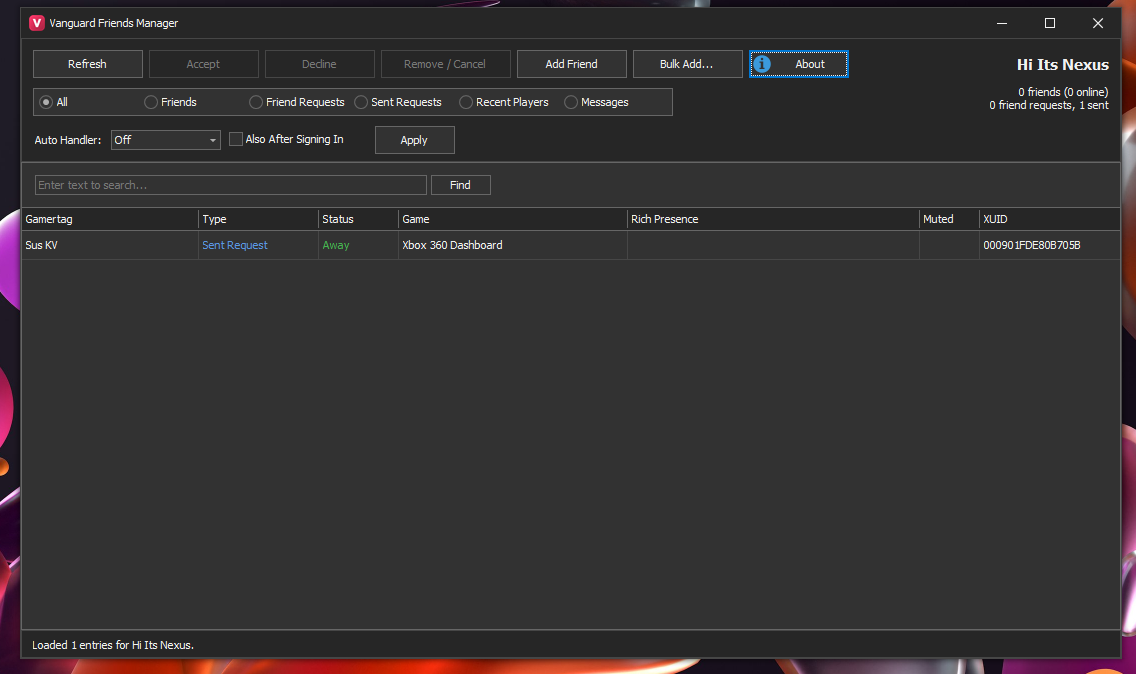
Your whole Xbox 360 friends list, managed from your PC.
No more scrolling through the Guide one person at a time. Your friends, friend requests, sent requests, recent players and messages load into one grid on your PC. Manage all of it with the Guide closed.
Friends
- See every friend with online status, current game and rich presence
- Remove friends, one or hundreds at once
- Filter by All, Friends, Friend Requests, Sent Requests, Recent Players, Messages
Friend Requests
- Accept / Decline incoming requests in bulk
- Cancel requests you've sent
- Add Friend by gamertag, or Bulk Add (one gamertag per line)
Recent Players
- Everyone you've played with recently and the game you met them in
- See who's already on your list, then select and add them all at once
Messages
- Read your inbox, reply and delete messages
- Message up to 100 players at once
- Handy, since 360 messages often never show up on the console
Player Actions
- Double-click anyone to open their gamercard on the console
- Invite to Party, Invite to Game, Mute / Unmute
- Everything is in the right-click menu and works on multi-select
Auto Handler
- Accept All or Reject All incoming requests automatically
- Keeps running even after you close the tool
- Also After Signing In handles requests that were waiting when you signed in
One notification per batch, not one per person. The plugin loads straight into console memory, so nothing is copied to your HDD.
Requirements
- Dashboard 17559 with XBDM + JRPC
- Signed in to Xbox Live
- Console added in Xbox 360 Neighborhood
- .NET Framework 4.7.2
Installation
Friends Manager - Setup & Help
Setup
- Boot your console with XBDM + JRPC and sign in to Xbox Live
- Set it as the default console in Xbox 360 Neighborhood
- Extract the zip and keep all the files together
- Open Vanguard Friends Manager.exe. The status bar should say Connected
- Press Refresh
How To Use
- Use the filter at the top to switch lists
- Ctrl / Shift + click to select several, then Accept, Decline or Remove / Cancel
- Right-click anyone for messages, invites and mute
- Double-click a player to view their gamercard
- Auto Handler: pick Accept All / Reject All, then press Apply. Set it to Off to stop it
FAQ
My Guide still shows old friends / requests?
- That's normal. The Guide only refreshes its friends list when you sign in again. The change is already done on Live.
Says "Not connected"?
- Check that XBDM is running, the console is the default in Neighborhood, and your PC and console are on the same network.
Refresh failed?
- Make sure JRPC is loaded and you're signed in, then press Refresh again.
Game invite didn't send?
- You need to be in a joinable game session (lobby or match).
Can't delete a friend request message?
- Decline the request instead. That removes the message, the same way the Guide does it.
Limits
- Messages go to 100 players at once, 250 characters each.
 Stuck on a step? Ask on the Vanguard Discord.