
Vanguard Capture Studio - Xbox 360 Screenshots
Clean, full-quality Xbox 360 screenshots saved straight to your PC as PNG. No more BMP files, no more garbage strips down the side of the image.
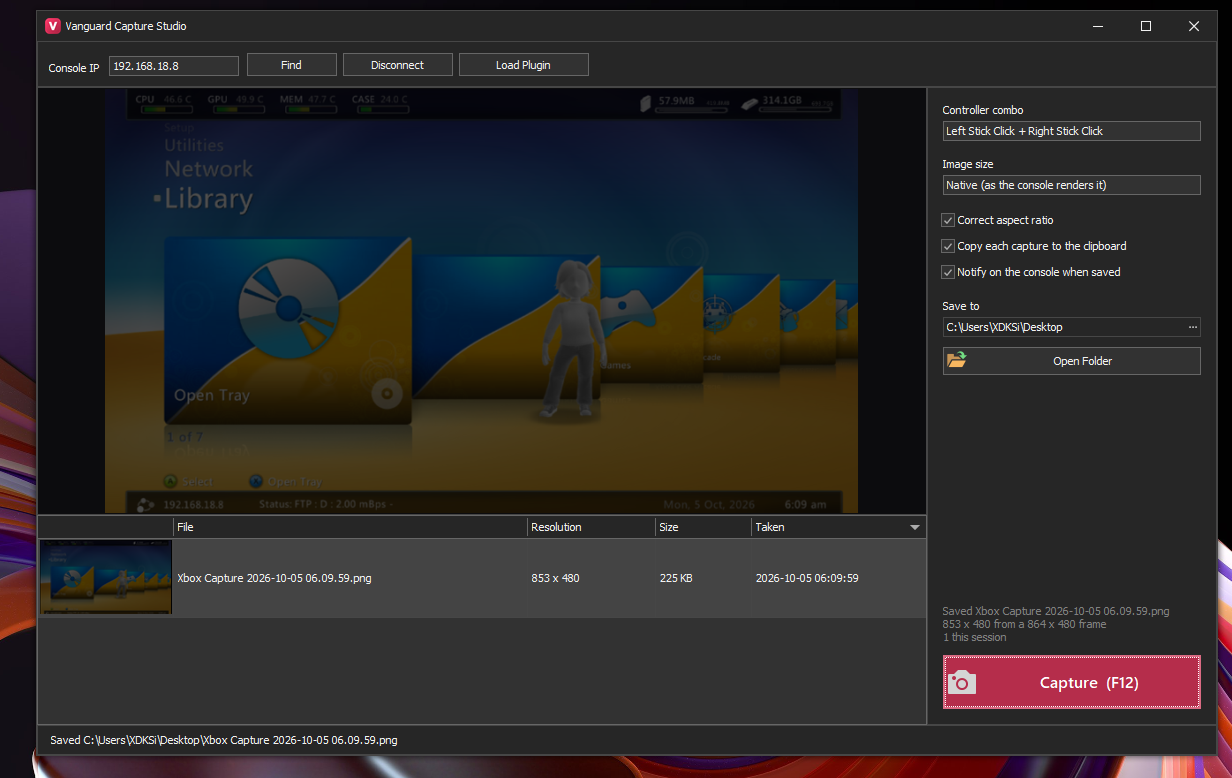
- Take a screenshot from your controller in any game or on the dashboard with a button combo (6 to choose from, e.g. Left Stick Click + Right Stick Click)
- Or press Capture / F12 in the app
- Saves PNG to your Desktop or any folder you pick, named by date and time
- Correct aspect ratio and proper cropping, including sub-HD games and the 480p dashboard
- Save at native resolution, 1280 x 720 or 1920 x 1080
- Optional copy to clipboard and an on-console "Capture saved to PC" notification
Capture gallery with thumbnails: open, show in folder, copy or delete
Load Plugin button: the small console plugin is loaded straight into memory from the app, nothing to copy to your HDD
Requirements
- RGH / JTAG console with XBDM
- JRPC2 loaded (for the Load Plugin button and the controller combo)
- Windows with .NET Framework 4.7.2 or newer
- Your PC and console on the same network
Installation
- Open Vanguard Capture Studio, enter your console's IP and press Connect
- Press Load Plugin
- Press your combo on the controller, or Capture / F12 in the app
 Stuck on a step? Ask on the Vanguard Discord.