
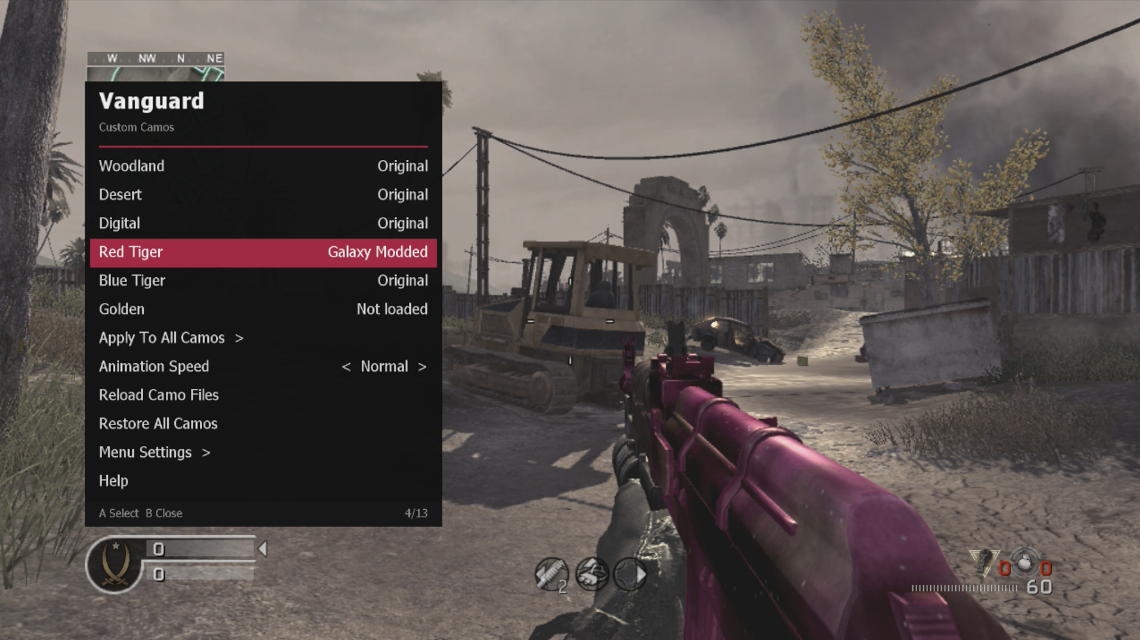
Custom weapon camos for Call of Duty 4: Modern Warfare on your JTAG/RGH. Swap Woodland, Desert, Digital, Red Tiger, Blue Tiger and Golden for any camo you like — static or animated — straight from an in-game menu.
Use
- Pick a camo slot, then a camo. Equip a weapon with that camo in your class to see it.
- Apply To All Camos puts one camo on every slot. Restore All Camos brings back the originals.
- Animation Speed controls how fast animated camos play.
- Reload Camo Files rescans the folder after you add files.
Your own camos
- DDS (DXT1/3/5) or TGA, 24 or 32-bit, in Hdd1:\Vanguard\Camos\ or Vanguard\Camos on a USB stick. Any size; the menu scales to 128–512 px.
- Animated: stack square frames top to bottom in one image (128 x 2048 = 16 frames).
Camos are only drawn on your console. Use in private matches or offline.
Requirements
- JTAG or RGH Xbox 360
- Call of Duty 4: Modern Warfare, multiplayer, title update 4
- Dashlaunch (or another way to load XEX plugins)
Installation
- Copy Vanguard_COD4.xex to your console and load it as a plugin (a Dashlaunch plugin slot works).
- Copy the Vanguard folder from the zip to the root of your hard drive so the camos end up in Hdd1:\Vanguard\Camos\ (the menu also creates that folder with a few samples on first start).
- In a multiplayer game, open the menu with LB + RB + D-Pad Up.
 Stuck on a step? Ask on the Vanguard Discord.
Release history
1.0 Oct 3, 2026
First public release.